
Requirements
Although you’re more than welcome to just read this post for general knowledge, check out my recommendations for what you need to have, in order to be able to fully use the provided information.
I have wanted small e-ink displays around the house for a long time, but I never really wanted another tablet, another always-on LCD, or another device that needs a charger every few days. What I wanted was much simpler: tiny, battery-friendly displays that can show slow-changing Home Assistant information and then quietly stay out of the way.
Things like a calendar note near my desk, a weather summary near the door, a guest Wi-Fi QR code, a room label, a reminder, or the current state of something I care about. Not a full dashboard. Just a small piece of information that should be visible without opening an app.
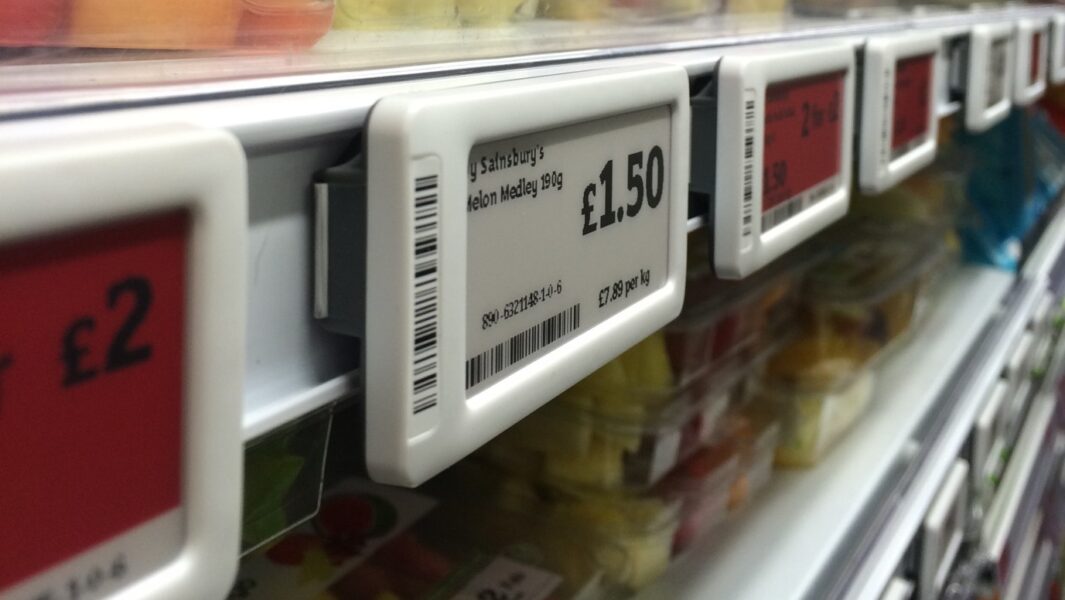
That is what led me to these PANDA / ETAG 2.13-inch BLE electronic shelf labels. They are cheap, readable, small, and use e-ink, so the display keeps showing the last image without needing constant power. The missing part was Home Assistant support, so I built a custom integration for them: PANDA ESL for Home Assistant.

Why This Device Is Interesting
Electronic shelf labels are made for exactly the sort of thing a smart home sometimes needs: show a small amount of information, update it occasionally, and keep it visible for a long time. The problem is that many ESL devices are tied to a specific hub, cloud platform, mobile app, or vendor workflow.
For Home Assistant, that is usually not what I want. I want the device to be local, scriptable, and boring in the best possible way. These PANDA / ETAG labels are BLE devices, and the integration writes the rendered image directly from Home Assistant over Bluetooth. No special hub, no cloud service, no opening the device, no soldering, and no custom ESP32 firmware.
The label I tested is a 2.13-inch display with a 256x128 resolution and three visible colors: white, black, and red. That is not a lot of space, but it is enough for the kinds of things I want from this class of display: a clear title, one or two useful values, a tiny icon, a QR code, or a compact reminder.
What the Integration Does
The PANDA ESL integration adds supported PANDA / ETAG labels to Home Assistant and exposes services for rendering and writing content to the screen.
- Discovers supported BLE labels through Home Assistant Bluetooth.
- Writes rendered content directly to the label over BLE.
- Supports the familiar Gicisky-style payload syntax for text, shapes, icons, QR codes, barcodes, charts, tables, and more.
- Creates preview and last-updated image entities, so you can see what was rendered.
- Includes a write progress sensor, which is useful because BLE image writes are not instant.
- Includes a guarded write service to avoid repeated writes from noisy automations.
That last point matters. E-ink labels are not meant to be refreshed every few seconds. They are perfect for slow information, but I do not want an automation accidentally hammering the label because a template updates five times in a row. For automations, I generally prefer panda_esl.write_guarded.
Installing It
The easiest installation path is HACS. Add moryoav/ha-panda as a custom integration repository, install it, restart Home Assistant, and then add the integration from the normal Integrations screen.
The label needs to be visible to Home Assistant over Bluetooth. If your Home Assistant server is not physically close to the label, use an ESP32 Bluetooth proxy nearby. That is usually the cleaner setup anyway, because these labels may live on a fridge, shelf, desk, or wall, not necessarily next to your server.
After the integration sees the label, you can add it and start writing content to it from Home Assistant services, scripts, and automations.
A Simple Write
This is the basic shape of a write action. Replace YOUR_PANDA_LABEL_DEVICE_ID with the Home Assistant device id for your label.
action: panda_esl.write
target:
  device_id: YOUR_PANDA_LABEL_DEVICE_ID
data:
  background: white
  rotate: 0
  payload:
    - type: text
      value: Hello PANDA
      x: 10
      y: 10
      size: 32
      color: black
    - type: text
      value: Updated from Home Assistant
      x: 10
      y: 58
      size: 16
      color: red
The integration renders that payload into an image and then writes it to the label. Since the screen is only 256x128, I find it best to keep layouts simple and intentional. Big text works better than trying to cram in a miniature dashboard.
Preview First, Then Write
One of the things I like about the integration is the preview flow. You can render a payload with dry_run: true and check the preview image entity before physically updating the label.
action: panda_esl.write
target:
  device_id: YOUR_PANDA_LABEL_DEVICE_ID
data:
  dry_run: true
  background: white
  payload:
    - type: text
      value: Guest Wi-Fi
      x: 12
      y: 8
      size: 26
      color: black
    - type: qrcode
      data: WIFI:T:WPA;S:MyNetwork;P:MyPassword;;
      x: 146
      y: 16
      size: 90
      color: black
    - type: text
      value: Scan to connect
      x: 14
      y: 74
      size: 16
      color: red
After the preview looks right, change dry_run to false, or remove it, and write the content to the physical label. For automations, the guarded service is usually the better default.
action: panda_esl.write_guarded
target:
  device_id: YOUR_PANDA_LABEL_DEVICE_ID
data:
  background: white
  debounce_override_ms: 30000
  payload:
    - type: text
      value: Front Door
      x: 10
      y: 8
      size: 28
      color: black
    - type: text
      value: Locked
      x: 10
      y: 54
      size: 34
      color: red
    - type: text
      value: Last checked by Home Assistant
      x: 10
      y: 102
      size: 12
      color: black
Where I Think This Fits
I do not see these labels as dashboard replacements. A dashboard is interactive, colorful, and constantly changing. These labels are the opposite, and that is why I like them. They are for information that should be visible, calm, and persistent.
- A daily calendar summary on the desk.
- A weather card near the front door.
- A guest Wi-Fi QR code.
- A reminder on a cabinet, pantry, or charging area.
- A small status display for something that changes only occasionally.
The e-ink part is the charm here. Once written, the label keeps showing the information without glowing, buzzing, or asking for attention. In a home already full of screens, that feels like the right kind of smart.
A Few Notes
- The integration is currently focused on supported PANDA / ETAG 2.13-inch BLE labels with a 256x128 display.
- The display supports white, black, and red. The service accepts yellow for compatibility with some payload formats, but yellow is mapped to red on this hardware.
- The label must be visible to Home Assistant Bluetooth when you want to write to it.
- This is better for occasional updates than fast-changing values.
- If you are placing labels around the house, Bluetooth proxies make the setup much more flexible.
Final Thoughts
This is one of those small smart home projects that makes me happy because it does not try to be bigger than it needs to be. The hardware is inexpensive, the display is readable, the battery-friendly e-ink behavior makes sense, and the integration keeps the control inside Home Assistant where I want it.
If you want to try it, the integration is available on GitHub here: moryoav/ha-panda. I also opened a Home Assistant Community thread for discussion and updates here: PANDA e-ink BLE Electronic Shelf Label support.