
If you’re like me and have a well-lit corner in your home filled with plants, you’ve probably thought about automating their irrigation, especially if you’re away for extended periods. I have about 20 plants in one such corner, and I wanted a smart, efficient way to water them every other day. However, I faced a challenge: there was no tap or water source nearby.
The Solution
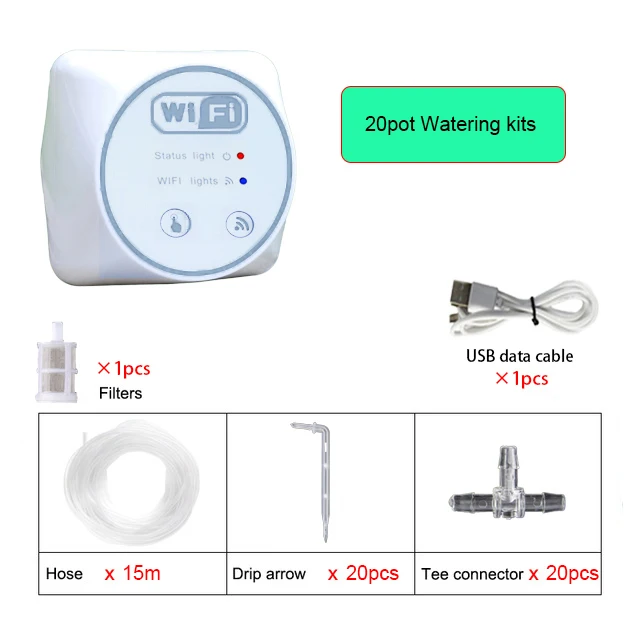
Enter the Wi-Fi water pump, which turned out to be the key to my irrigation setup. You can find the pump here or from the link below. It’s designed to connect and irrigate anywhere from 1 to 20 plants, and it comes with a transparent hose, T-shape connectors, and drip arrows. Setting it all up is quite straightforward, and the hose can easily be hidden behind the plants for a neat look.
For the water source, I decided to repurpose a 5L empty detergent container, filling it with water. The pump efficiently draws water from this container, and I only need to refill it every 10-14 days—perfect for my needs.

Why This Pump is Special
This isn’t just any pump—it’s Wi-Fi activated and fully controllable via an app or Home Assistant. The pump pairs with the Smart Life app, which I’ve discussed in relation to other smart home products. Once paired, it’s automatically recognized in Home Assistant, allowing for control of the pump’s on/off state. From there, you can easily set up schedules and plan irrigation times. Even if you’re not using Home Assistant, the Smart Life app provides robust control with timers and scheduling options.
The pump is powered via a USB cable, which I connected to a phone charger and plugged into a wall socket. It’s a simple yet effective setup that works perfectly.
For those interested in specifications, the pump advertises a water pressure of 2-2.5kg and a flow rate of 800 ml/min. I haven’t measured these myself, but it works seamlessly for my 20 plants, delivering consistent water flow.


A Few Important Tips:
- Offline Notifications: In the Smart Life app, there’s a setting called “Offline Notifications.” I recommend enabling this so that you’re alerted if the pump goes offline.
- Restart Status: Another setting to tweak is the “Restart Status.” This determines what the device should do if there’s a power outage and the power comes back on. You’ll want this set to “Restart Memory” which means the pump will resume whatever it was doing after it’s back from a power out.
- Drip Arrows: After a while, I ended up replacing the bundled elbow-shaped drippers with 0.5L/H irrigation drippers from a local gardening store. These provided a more consistent and accurate drip across all my plants.
Final Thoughts
This smart irrigation setup has been a game changer for my indoor plants, providing peace of mind when I’m away. With the ability to control the system through Home Assistant or directly via the app, it’s a versatile solution that keeps my plants healthy and hydrated.
I got my device in the following link: